· AI tooling, Fabric
How to Install Microsoft's Fabric Skills
Microsoft's skills for Fabric teach your AI coding tool how to work with Fabric. This guide explains how skills, agents, bundles, and MCP servers fit together, installs the current bundles in Claude Code, and runs one prompt that documents a whole workspace.
What you'll learn
- How skills, agents, bundles, and MCP servers fit together, and the path one prompt takes through them
- Install the fabric-skills and powerbi-authoring bundles in Claude Code, or a single skill with APM
- Sign in once with the Azure CLI and check that every MCP server connected
- Document a whole Fabric workspace with one prompt, and decide how much the agent may do without asking
- Keep the skills current as the repository changes
An AI coding tool such as Claude Code or GitHub Copilot CLI doesn’t come knowing Fabric’s APIs or query patterns. Microsoft’s skills for Fabric fill that gap. Each skill is a Markdown file, SKILL.md, that teaches the tool one Fabric job: the phrases that should trigger it, the REST APIs or commands to use, the authentication the job needs, and the practices to follow. Your tool loads the installed skills when a session starts, matches your prompt against them, and follows the instructions of the skill that fits. A skill doesn’t run anything on its own. The AI tool decides what to do with the guidance.
Microsoft Learn puts the difference between skills and MCP servers this way: skills teach the AI assistant what to do, and MCP servers do it. An MCP server is a running program that gives an agent live access to data and APIs, under the open Model Context Protocol.
| Skills | MCP servers | |
|---|---|---|
| Purpose | Knowledge and patterns | Live access to data and APIs |
| Content | Markdown documentation | Executable servers |
| Runtime | Loaded into the AI’s context | Run as separate processes |
The skills live in the microsoft/skills-for-fabric repository on GitHub, open source under the MIT license. Microsoft released them publicly at Build, on June 2–3, 2026, and Arun Ulag’s Build post calls them Agent Skills for Fabric. Claude Code and GitHub Copilot CLI install them from a plugin marketplace. VS Code picks them up from Copilot’s install, and Cursor, Windsurf, and tools that read AGENTS.md (Codex among them) use a clone of the repository. Claude Code is an officially supported target, and it’s the tool this article uses. If you haven’t used it with Power BI before, How To Use Claude Code for Power BI Development starts from the beginning.
Because a skill is plain Markdown, you can read exactly what it tells your AI before you install it. Here is the top of the fabriciq skill:
---
name: fabriciq
description: "Answers natural-language business questions over existing Power BI reports and semantic models through the FabricIQ MCP endpoint, discovering artifacts, resolving entities, generating the DAX itself, and returning a plain-language answer. Use when the user asks a data question, including one that says to query the model directly. For DAX the user supplies, or measures to save, use semantic-model-authoring."
---
The description, with the requests it names, is what your tool matches your prompt against. The rest of the file, and the reference files in the skill’s folder, carry the detail. A few skills also ship small helper scripts among their references.
This article follows one prompt from start to finish:
Please use the Fabric skills to document the Samples workspace.On the way to an answer, it passes through every layer of the repository.
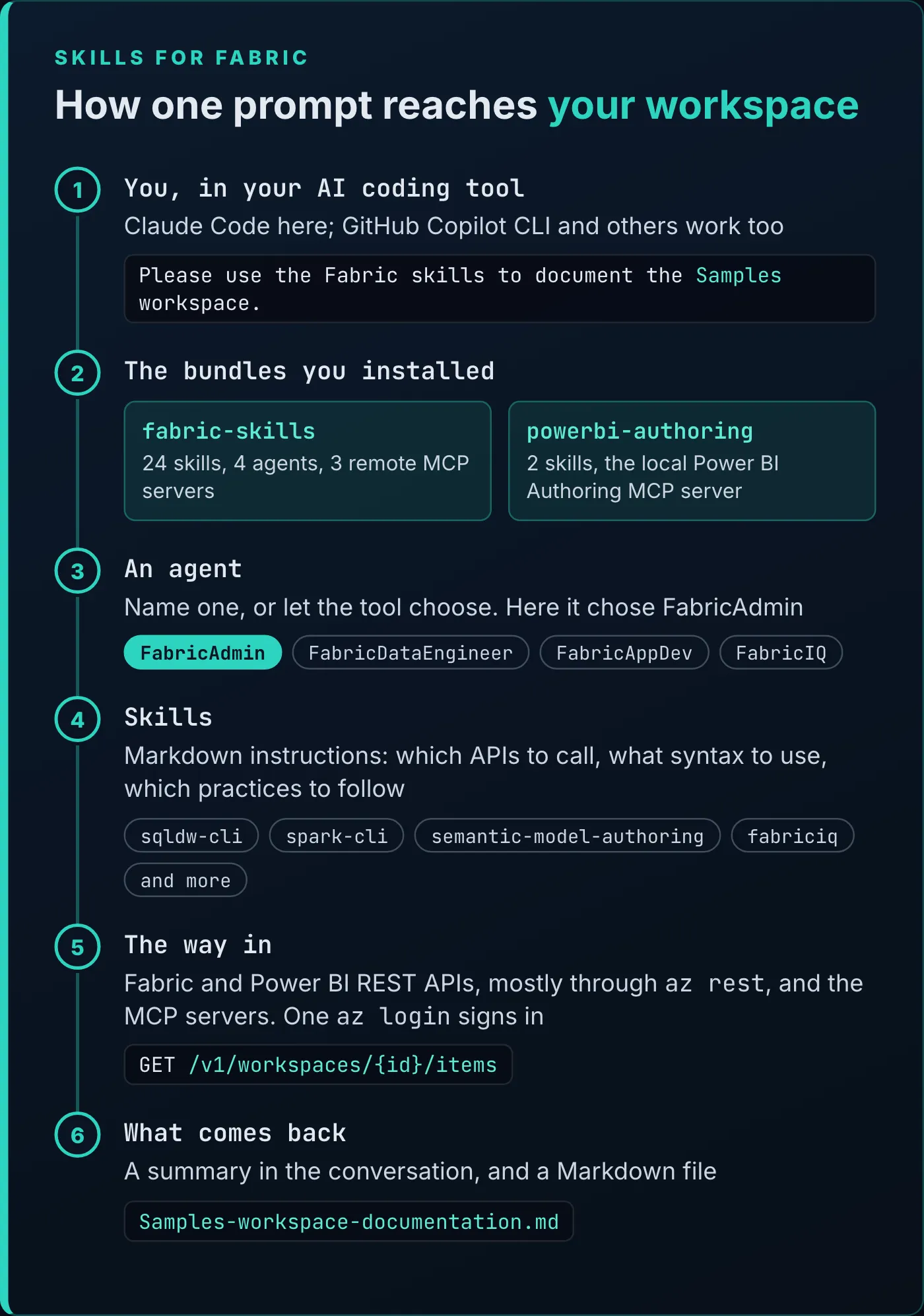
The layers between a prompt and your workspace, with the path this article’s example took.
Bundles are what you install. Each one packages skills with the MCP servers they use, and fabric-skills adds agents. There are two today, fabric-skills and powerbi-authoring, covered in the next section.
Agents are what Microsoft Learn calls experimental agent specializations: teammates with a persona and a set of workflows, which hand the detailed work to skills. The fabric-skills bundle installs four of them. FabricAdmin handles administration, governance, security, and workspace documentation and inventory, and its file describes it as “a pragmatic, security-conscious platform administrator”. FabricDataEngineer runs data engineering work across Spark, warehouses, pipelines, and lakehouses. FabricAppDev builds applications on Fabric data through Python, ODBC, XMLA, and REST. FabricIQ answers questions about Power BI reports and semantic models. You can name an agent in your prompt or let the tool choose one. Microsoft Learn’s example names it: Using FabricAdmin, document my Workspace FabricCLIDemo. The prompt above names no agent, and Claude Code chose FabricAdmin, whose file lists workspace documentation among its jobs and carries a workflow for it:
### Workspace documentation
Use the spark-cli skill to identify the workspace and use the other Fabric skills to operate.
When asked to "document my workspace" or similar, first make sure to confirm the workspace (find it and display its properties, Id, description).
Then, take a look at the Fabric workspace.
Please document the data solution, the role of each artifact, the lineage, and what happens in which artifact with my data.
Look at notebooks and pipelines to understand what they do.
BE CONCISE AND INTERESTING:
* Don't spell out all details (such as column names or types)
* See if there is any interesting business logic in views or stored procedures in warehouses or SQL Endpoints. Call out anything interesting
* Look at the semantic models to see what they do.
* Write all results to a WorkspaceReport folder, in markdown format, with a top level overview plus one report per artifact type.
Skills each cover one Fabric item. Since August 2026 they’re named {item}-cli, such as sqldw-cli, spark-cli, eventhouse-cli, and powerbi-report-cli, and each one carries its authoring, consumption, and operations work as modes inside it. The repository has 25 skill folders.
The last layer is the way in. The skills tell the agent to call the Fabric and Power BI REST APIs, mostly through the Azure CLI’s az rest, and the bundles add MCP servers. fabric-skills brings three remote ones: FabricIQ (read-only questions over Power BI reports and semantic models), the hosted Power BI Authoring MCP server (in preview), and a Fabric SQL endpoint server. powerbi-authoring brings the local Power BI Authoring MCP server, the one The Power BI Modeling MCP Server, Hands-On works with; Microsoft renamed it from the Power BI Modeling MCP server in September 2026. Of the 25 skills, 24 also tell the agent to label every call to api.fabric.microsoft.com with the skill’s name. From sqldw-cli:
Every `api.fabric.microsoft.com` call must carry
`x-ms-fabric-skill: sqldw-cli` (`az rest`: `--headers "x-ms-fabric-skill=sqldw-cli"`),
including every LRO poll, `fabric_lro` and retry.Before you start, you need:
- An AI coding tool. This article uses Claude Code.
- The Azure CLI. Most Fabric operations sign in through it.
- Permission on the Fabric workspace you’ll point the skills at, for the operations you ask for.
- For
powerbi-authoring, a Power BI tenant where you can create and publish semantic models and reports. Microsoft also recommends Power BI Desktop, to open and check projects locally.
The repository ships two bundles from one marketplace, named fabric-collection:
| Bundle | Skills | Agents | MCP servers |
|---|---|---|---|
fabric-skills | 24, for authoring, consumption, operations, migration, and end-to-end architecture | FabricAdmin, FabricDataEngineer, FabricAppDev, FabricIQ | FabricIQ, the hosted Power BI Authoring MCP server, and the Fabric SQL endpoint server, all remote |
powerbi-authoring | 2: semantic-model-authoring and powerbi-report-cli | None | The local Power BI Authoring MCP server, started through npx |
fabric-skills doesn’t include powerbi-authoring, so install both for full coverage. In Claude Code, type these three commands at the prompt:
/plugin marketplace add microsoft/skills-for-fabric
/plugin install fabric-skills@fabric-collection
/plugin install powerbi-authoring@fabric-collection
The first adds Microsoft’s marketplace; the other two install the bundles. Then quit Claude Code and start a new session, so it loads the skills. The same commands work in GitHub Copilot CLI. From a terminal instead of a Claude Code session, the repository’s MCP guide uses claude plugin marketplace add and claude plugin install with the same arguments.
Plugin bundles install whole. To install a single skill, Microsoft points to APM, the Agent Package Manager:
apm install microsoft/skills-for-fabric --skill sqldw-cli --target claudeThe --skill values are the folder names under skills/ in the repository. Two things come along with any single skill: APM registers every Fabric MCP server unless you add --only apm, and it deploys all the repository’s agents. A smaller install keeps the AI focused and limits what it can reach, which matters most when it runs unattended, in a release pipeline for example.
The bundles have changed since the recording in June 2026. The three focused bundles fabric-authoring, fabric-consumption, and fabric-operations were retired in August 2026, and their names now install the full fabric-skills bundle, so an existing install keeps working. The --filter option for narrowing the full bundle left the README in July 2026, and single-skill installs through APM arrived in September. Microsoft Learn’s install page, last updated September 29, 2026, still lists the retired bundles and --filter; the repository’s README has the current commands.
Sign in once, then check the connections
The skills and the bundled MCP servers sign in through the Azure CLI. Check which tenant it’s on, without printing any credentials:
az account show --query tenantId --output tsvIf you aren’t signed in, or it’s the wrong tenant, sign in:
az login --tenant <tenant-id> --allow-no-subscriptionsSince September 2026, the fabric-skills plugin reuses that sign-in for its three remote MCP servers in local Claude Code, so there’s no token to copy and no app to register. Your workspace permissions, tenant policies, and consent settings still apply.
Then check the servers. From a terminal, run claude mcp list; inside Claude Code, type /mcp. Read each server’s status: the repository’s MCP guide warns that a successful install, or an exit code of zero, doesn’t mean every MCP server connected.
If you registered a FabricIQ server by hand, that older entry can take precedence over the plugin’s, and FabricIQ moved to a new endpoint on September 17, 2026. If the old entry fails, remove only that entry, using the name and scope /mcp shows, for example:
claude mcp remove --scope local FabricIQDocument a workspace with one prompt
With the bundles installed and the Azure CLI signed in, the video runs the article’s example prompt against a workspace named Samples, which holds Power BI’s eight standard sample domains: a semantic model, a report, and a dashboard for each.
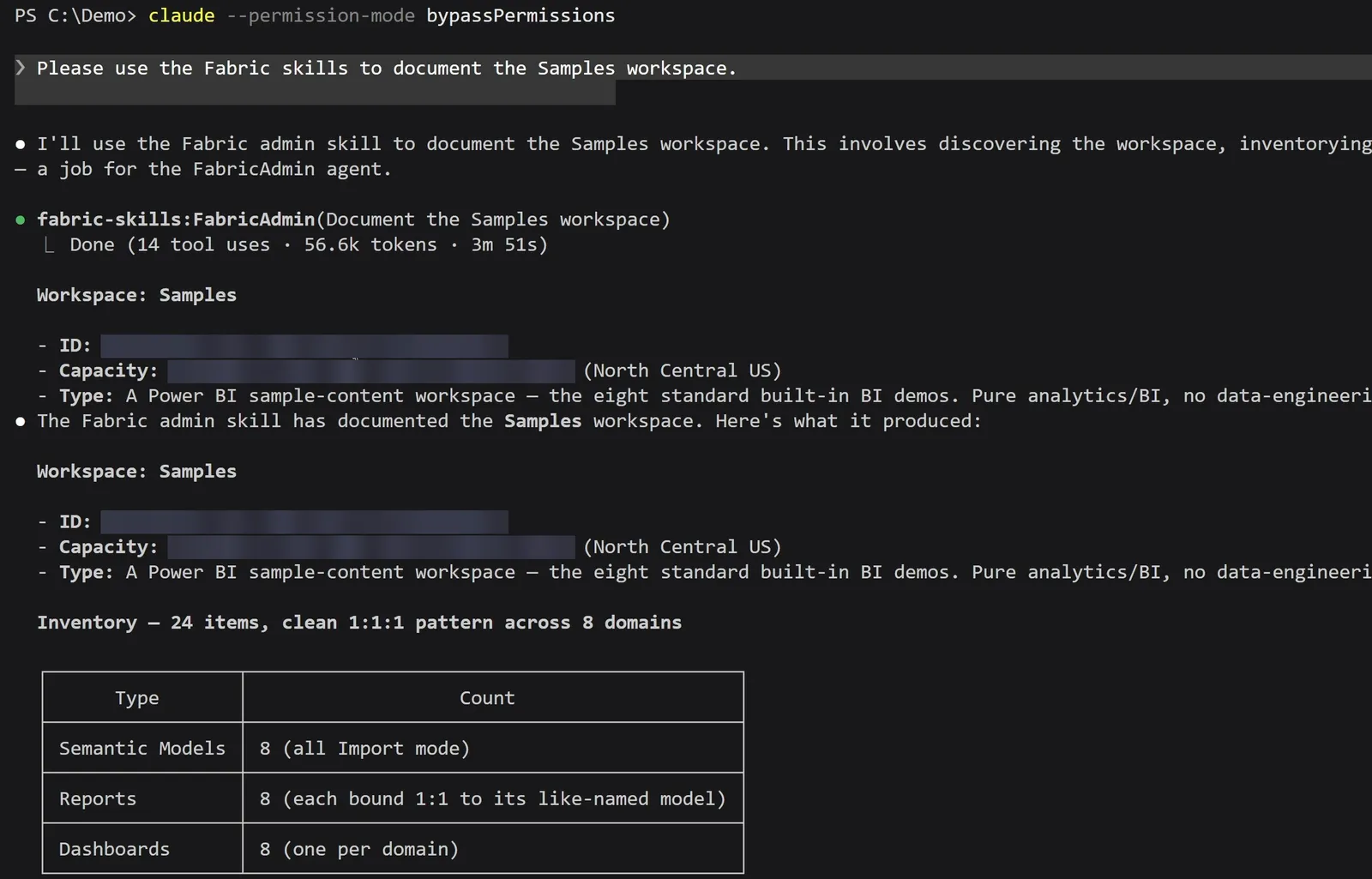
One prompt. Claude Code picked the FabricAdmin agent, which took 14 tool calls and just under four minutes.
The agent finished in 14 tool calls, 56.6k tokens, and 3 minutes 51 seconds. It summarized the workspace in the conversation (24 items, 8 of each type, every report bound to the model of the same name) and wrote the full documentation to C:\Demo\Samples-workspace-documentation.md.
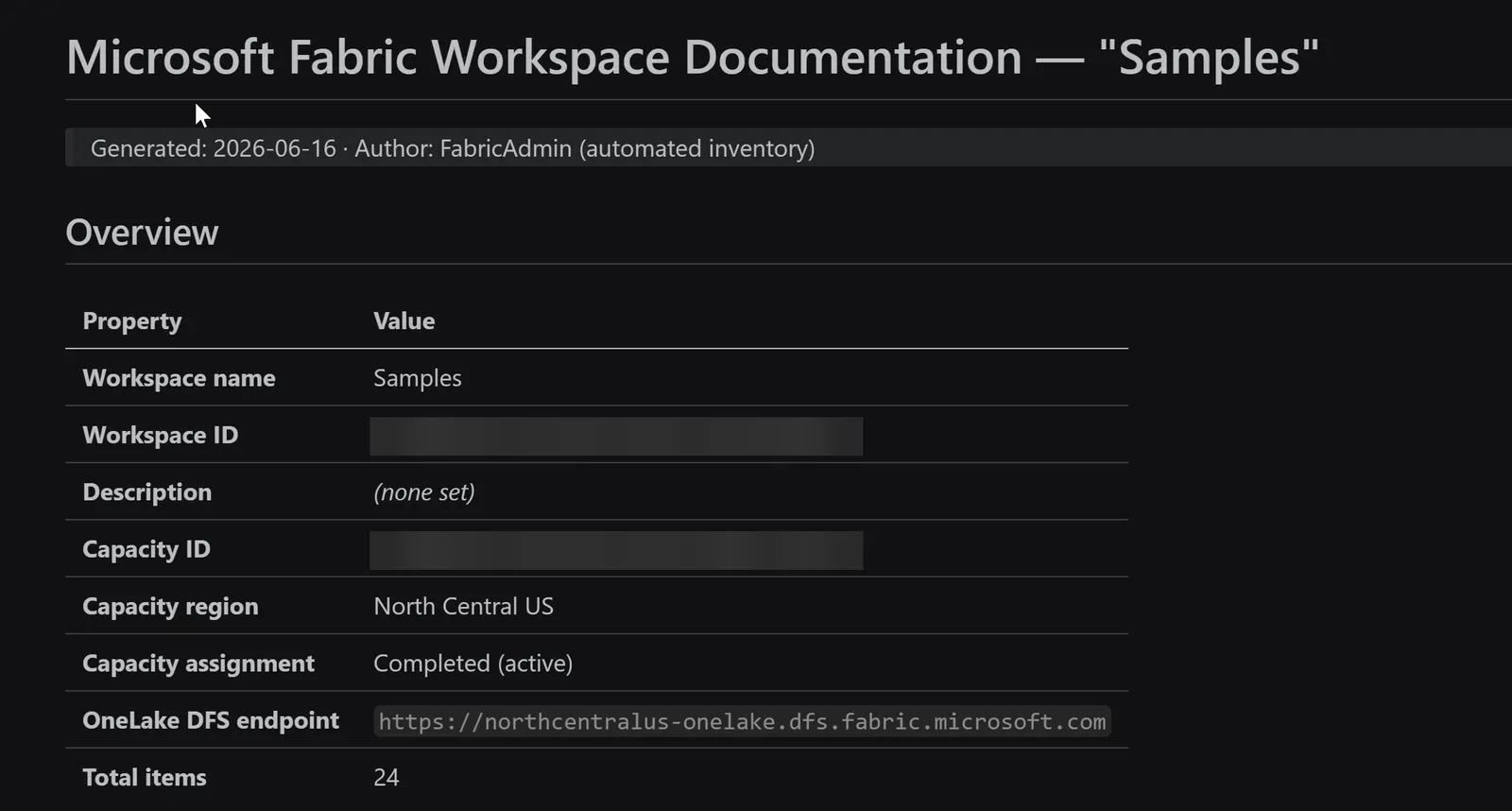
The top of the file the agent wrote.
The file opens with an overview of the workspace and its capacity, then a table of which semantic model each report is bound to, then an inventory by item type, with the main tables of each model read live through DAX’s INFO.VIEW.TABLES(). An appendix at the end of the file records how each part was collected:
- Workspace and item inventory: the Fabric REST API,
GET /v1/workspacesand/v1/workspaces/{id}/items - Report-to-model bindings: the Power BI REST API,
GET /v1.0/myorg/groups/{id}/reports - Model configuration and refresh status: the Power BI REST API,
.../datasetsand.../datasets/{id}/refreshes - Table structure: DAX
EVALUATE INFO.VIEW.TABLES()through/datasets/{id}/executeQueries
You could have the agent regenerate this documentation on every release to production, or every night, and see what meaningfully changed from one run to the next.
Your own run may look different. The FabricAdmin workflow asks for a WorkspaceReport folder, with an overview plus one report per item type, and this run wrote a single file instead. Microsoft Learn’s version of the prompt is longer and spells out what to look at, which suits a workspace with notebooks, pipelines, and warehouses in it:
Document my Fabric Workspace: take a look at the workspace called
FabricCLIDemo. Document the data solution, the role of each
item, the lineage, and what happens in each item with my
data. Look at notebooks, pipelines, views, stored procedures, and
semantic models. Write all results to a WorkspaceReport folder in
Markdown format.
How much to let the agent do without asking
The demo started Claude Code with --permission-mode bypassPermissions, so it ran the whole job without stopping to ask before an API call or a file write. Claude Code’s documentation says to use that mode only in isolated environments, like containers or VMs, where Claude Code can’t cause damage. The demo ran in a Windows virtual machine in Parallels, and this prompt only reads from Fabric. Other skills in the repository create and change items, and an MCP client acts with your Fabric permissions; Microsoft’s Power BI MCP overview warns that “an autonomous or misconfigured client might perform destructive actions.”
For a first run, Microsoft Learn recommends planning before executing: start in plan mode, check the plan, and only then let the agent act. In Claude Code’s plan mode, Claude reads and explores but doesn’t edit your files. Learn also suggests naming the workspace in every prompt and adding “Before making any changes, ask me which workspace to use.”
My own view is that this comes down to trust. We hire people and trust them every day to avoid serious mistakes and to act in our best interest. Yet we tend not to extend that trust to AI, even though it can be tested, constrained, and given guardrails, and it has no motive to cheat or steal. Things can still go wrong, and some third parties will try to exploit an agent, through prompt injection for example, so you need to protect against that. In the end, your company will likely set the policy, and most people won’t be able to turn on bypass mode.
Claude Code has a setting for that policy: an administrator who sets disableBypassPermissionsMode in managed settings turns bypass mode off, and no user setting can override it.
The repository was on version 0.3.3 when the video was recorded in June 2026, with about 520 stars. By October 17, 2026, the latest GitHub release was v0.3.18, from September 25, the changelog already listed 0.3.19, and the repository had 1,252 stars. Releases have come about once a week.
Turn on automatic updates in Claude Code once. Microsoft’s marketplace is a third-party marketplace, so it doesn’t update on its own:
- Type
/plugin. - Open Marketplaces and select
fabric-collection. - Choose Enable auto-update.
To update on demand from a terminal, run claude plugin update fabric-skills@fabric-collection, and the same for powerbi-authoring. Administrators can set "autoUpdate": true on the marketplace’s entry in managed settings instead.
Read CHANGELOG.md before you rely on a skill’s name in a prompt or a script. Names change: on September 17, 2026, powerbi-report-cli replaced four separate report skills.
Beyond documentation, each of these jobs has a skill behind it:
- Building Power BI reports and semantic models:
powerbi-report-cliandsemantic-model-authoring. How To Use Microsoft’s Fabric Skills To Build a Power BI Report shows the Power BI skills building a report. AI Can Now Check Its Edits in Power BI covers the Desktop Bridge, which lets an agent reload the report in Desktop and screenshot it. - Asking plain-English questions of your Power BI data:
fabriciq. - Diagnosing slow queries and warehouse health: the operations mode of
sqldw-cli. - Real-time intelligence:
eventhouse-cli,eventstream-cli, andactivator-cli. - A medallion architecture, built end to end:
e2e-medallion-architecture.
Install both bundles, sign in with az login, and run the workspace prompt against a workspace you can read. Then open the file it writes and check it against what you know is in that workspace.
Tools
- Claude Code (GitHub Copilot CLI uses the same install commands)
- Skills for Fabric: the fabric-skills and powerbi-authoring bundles
- Azure CLI
- A Microsoft Fabric workspace
Prerequisites
- An AI coding tool such as Claude Code or GitHub Copilot CLI
- The Azure CLI, and permission on the workspace you point the skills at
- For powerbi-authoring, a Power BI tenant where you can publish models and reports, and Power BI Desktop (recommended)
Resources
- microsoft/skills-for-fabric, GitHub
- Skills for Fabric changelog, GitHub
- Fabric MCP setup for Claude Code, Codex and VS Code, GitHub
- Skills for Fabric overview, Microsoft Learn
- Install Skills for Fabric, Microsoft Learn
- Fabric MCP servers overview, Microsoft Learn
- Overview of the Power BI MCP servers, Microsoft Learn
- Configure permissions, Claude Code documentation
- Microsoft Build 2026: Building agentic apps with Microsoft Fabric and Microsoft Databases, Azure blog
Related articles


Transcript
An AI documents a whole workspace
One prompt, and Claude Code just inventoried and documented my entire Power BI workspace.
What Microsoft just shipped
Okay, so here's what just happened. About two weeks ago at Build, Microsoft announced a new public repository on GitHub that contains, presently, 28 different skills and several different personas that are going to help you do your Power BI and Fabric work much more effectively. This repo is open sourced and MIT licensed, which means that you can download this and read it right now. And it's not code. It's actually prose, which means that even for a non-coder like myself, I can make sense of this and leverage this tool and still be very comfortable with what this is doing. This is designed to key into your AI and harness of choice, meaning that it can work with Copilot CLI, Claude Code, Codex, Cursor, Windsurf, you name it. This is a brand new repository from Microsoft. It's already got about 520 stars the last time I checked, so we're
The one-line prompt and what it returned
gonna dive into it today. Okay, so how did this actually work? Well, we're gonna go through the setup in just a moment, but once you get it set up, all I had to do was authenticate with Microsoft, and then I gave it this prompt. I said, please use the Fabric skills to document the samples workspace. Samples is one of my workspaces, and you can see it connected to that workspace. It found some some summary details that it shared with me in the conversation here, but it also created this documentation markdown file, and so we can take a look at that right now. And so you can see here that it gave me a really detailed analysis of this workspace, so it's got a lot of great detail. High level, it goes into do all the different assets therein, what some of the architecture, what some of the architectures are, some of the reports and the relationship to semantic models, and so on. So this is a really detailed report that is great for documentation purposes, for for understanding what is in the report. And just imagine if you were to use this tool to document this report every time that you had a release to production, for example, or even every night, you could have it recreate this documentation or see what has meaningfully changed from one iteration to the next, or from one night to the next even.
The mental model: connections, skills, personas, bundles
So before we install anything, we want to cover the mental model. So this is how the repo is structured. So we start out with ways to connect to the repository down here at the bottom. We've got the Power BI modeling MCP server and the Fabric MCP server. There is also, not pictured here, a Fabric CLI and an Azure CLI. AI tools love CLIs. Not only are they really good at using them, but they're also very token efficient as well. Above that, you've got currently 28 different skills. So think of these as the instructions to the AI as to how you actually do the work that you want to do. So these skills are going to access Fabric through these MCPs and CLIs down here. You've also got several different personas, and these sort of inform the personality of the AI, if you will. So for example, the Fabric admin is designed to be very security conscious. The Fabric IQ is designed to help answer natural language queries and to be very helpful, for example. And you've also got various bundles, and so these bundles will bundle one or more personas, one or more skills, and one or more of these ways to connect to Fabric. You can also just install the entire repo if you'd like to do that. And so the way to think about this is that you are going to to install one or more of these bundles, and then you're going to act as a given persona. The persona in turn will delegate your instructions to one or more skills, and those skills are going to access content in Power BI and Fabric through one of these access tools.
Installing a bundle and wiring the MCP
Okay, so let's say you're now ready to install the Fabric skills. So how would you do it? Well, there are a few different ways. So number one, you can simply type in slash plugins install FabricSkills at Fabric Collection, and that will install the entire repo, the entire collection, if you want. You can also say Fabric Consumption instead if you only want, for example, the consumption bundle. And you can also use the filter parameter and filter on the objects this way if you would like. Why might you want to do this? Well, for example, if you were to use this headlessly, say in a GitHub release pipeline, for example, you might want to limit the surface area over which the AI can operate. You might want to do this for security reasons, but you also might want to do it to keep the AI focused and limit the ability for the AI to become confused, for example. One other quick note on how you can install it. You can also just come here to the GitHub repo, copy this URL, and give that to your AI tool of choice. It can review the repo, and there's a number of different installation parameters here. Your AI can figure this out and run the commands necessary to install it for you.
It's brand-new and moving fast
This repo is growing really fast. Like I say, it's only been out for about two weeks. It's on version 0.3.3 right now and has about 520 stars the last time I checked. What that means is that things might function differently a day, a week from now than they do right now, which means that your behavior might change, but also it means that something that doesn't work quite the way you want it to now might work much better in the future. So give it a try. Keep trying. I promise you the efficiency gains are worth it.
Where this goes next
So you can build Power BI reports and models with this tool. You can ask plain English questions against your data sources. You can diagnose slow queries and investigate data warehouse health. You can even do real-time intelligence and even have it help you build out a medallion architecture if you want.
What to watch first, and subscribe
What I want to know is, what are the areas that you want to see more on? And I'm going to deep dive on those areas. So let me know that down in the comments below. And be sure to get subscribed so you won't miss those videos when they come out. For a link to that GitHub repo, it's in the description down below. And by the way, the repo comes with the Power BI Modeling MCP server, and I've already done a deep dive on that. You can check out that video right here. And I'll see you next time.
New articles and videos